Rawda Essentials

From downloading the Nusuk app, troubleshooting the notorius “This Nusuk ID already exists”, to registering and booking a successful Rawda appointment…we’ve got you covered!
FAQ
-
Generally, yes. The Nusuk app typically allows users to book a Rawdah appointment only once every 365 days when booking in advance through the standard reservation system.
However, there are a few important exceptions:
Instant Track Appointments: While in the vicinity of Masjid Al-Nabawi, Nusuk may offer additional same-day appointment opportunities through the Instant Track feature. To use this feature, location services must be enabled for the Nusuk app.
Pre-Hajj Window: In recent years, there has occasionally been a short period shortly before Hajj during which the standard 365-day restriction has temporarily disappeared, allowing some users to book again even if they had visited within the previous year.
Because these changes are not formally announced in advance and can be brief, we recommend subscribing to our newsletter for updates whenever appointment availability patterns change.
-
One of the most common questions we receive is about the various icons displayed during the Rawdah booking process in the Nusuk app.
Unfortunately, Nusuk does not currently provide an official guide explaining what each icon represents.
To make things easier, we have created a visual icon guide BELOW that explains the meaning of each icon based on community observations and user experiences.
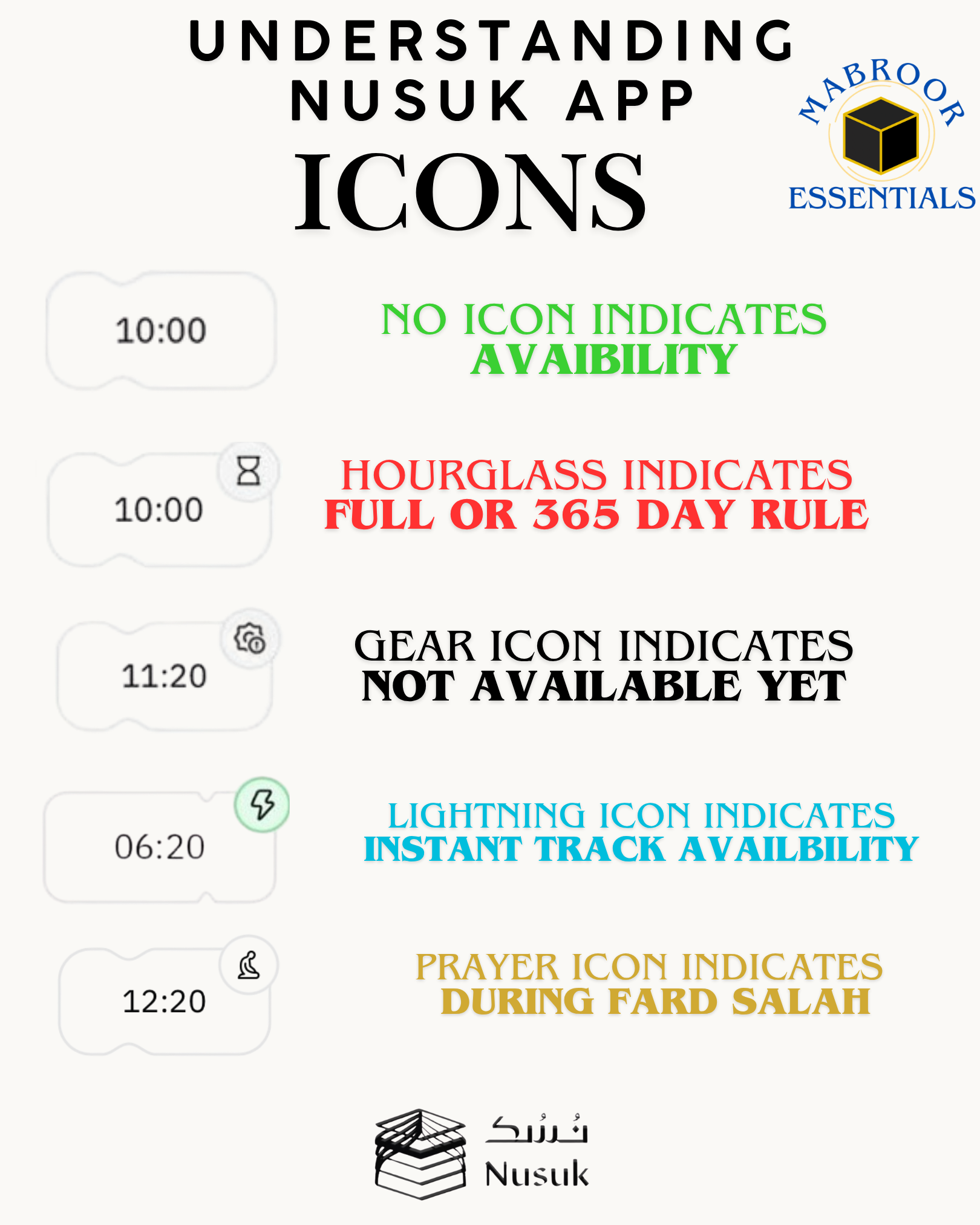
-
Yes. As long as your scheduled appointment time has not passed, you can cancel your existing Rawdah appointment and book a new one through the Nusuk app.
-
No worries — this is normal.
Approximately 48 hours before your scheduled Rawdah appointment, Nusuk will provide a button allowing you to confirm your attendance.
The countdown you see is simply showing when that confirmation option will become available.
Once the confirmation button appears, you must confirm your attendance before the deadline. Generally, confirmations can be made until approximately 2 hours before your appointment time. Failure to confirm may result in your appointment being cancelled.
Key takeaway: If you cannot click anything yet, it simply means the confirmation window has not opened. Wait for the countdown to expire and the confirmation button should appear.
When do I receive my Rawdah QR code?
Many pilgrims become concerned when they successfully confirm their Rawdah appointment but still cannot see a QR code.
Again, this is is normal.
For security reasons, the Rawdah QR code typically does not appear until approximately 2 hours before your scheduled appointment time, even if you have already confirmed your attendance during the 48-hour confirmation window.
Timeline
48 hours before appointment
Confirmation button becomes available.
You should confirm your attendance.
Up to 2 hours before appointment
QR code is generally not visible yet.
Approximately 2 hours before appointment
QR code appears in the Nusuk app.
You can then use it to enter Rawdah at your scheduled time.
Key Takeaway
If you have already confirmed your attendance but do not see a QR code yet, there is usually no need to worry. Simply check again closer to your appointment time, as the QR code typically becomes available about 2 hours before your scheduled entry.
-
This is a known issue affecting iPhone (iOS) users. Previously, the date displayed in the Nusuk app would often automatically correct itself after arriving in Saudi Arabia. However, t this resynchronization is no longer happening with the latest Nusuk App update
The safest assumption is this:
The date you see in the Nusuk app after booking is the date you will actually receive.Recommended Solutions
Option 1 (Recommended)
Book your Rawdah appointment through the Nusuk Services website instead of the mobile app.(see below for instructions)Option 2 (Best Technical Fix)
Before booking, manually change your iPhone's time zone:Go to Settings → General → Date & Time
Turn Set Automatically OFF
Change your time zone to Makkah (Mecca)
Complete your Rawdah booking
Turn Set Automatically back ON
Option 3 (If Booking Through the iPhone App)
Some users have found success by selecting one day after their intended date.Example:
Desired appointment: May 20
App displays: May 19
Try selecting May 21 instead so the displayed date aligns with your intended visit.
Key Takeaway
Do not assume the date will automatically correct itself upon arrival in Saudi Arabia. Carefully verify the date shown after booking, as that is likely the date associated with your appointment.
Booking Through the Nusuk Website
To book through the website:
Change the language to English (top left corner)
Click Login with Nusuk Account
Select Foreign Guest
Log in using the same credentials you use for the Nusuk app
Many users have found the website booking process to be more reliable when dealing with date discrepancies.
NOTE: Last updated: May 2026. Nusuk app behavior may change with future updates. This guidance is based on reports from recent users.
-
This is one of the most frustrating Nusuk issues because the usual options often do not solve the problem.
Deleting your account, resetting your password, or clicking “Logout and Recover” may still bring you right back to the same error loop.
We’ve put together a step-by-step tutorial showing the current troubleshooting method that has worked for many users.
Please follow the tutorial below carefully to resolve the issue.
-
Yes. Every person entering Rawdah must have their own appointment, including children.
To add a child to your booking, add them as a dependent within the Nusuk app. After entering their nationality and passport information, they should appear under your account as a "Companion Under 18."
Important Notes About Children
While Nusuk may allow you to add very young children as companions, entry into Rawdah is ultimately controlled on-site.
In practice, children under the age of 7 are typically not permitted to enter Rawdah. Additionally, admission for older children may vary depending on crowd levels and the discretion of the staff managing access.
For this reason, even if a child successfully receives an appointment through Nusuk, entry is not always guaranteed.
Key Takeaway
Every visitor needs their own appointment.
Children can be added as dependents in Nusuk.
Children under 7 are generally not permitted(we have even seen some 9 year olds get rejected)
Final admission decisions are made by the staff and guards managing Rawdah access.
-
Absolutely, please take a screenshot of your QR code(or add it to your apple wallet)
-
Because the Rawdah’s 1 year allowance is linked to your passport, not the visa.
-
Nusuk now includes a Friends feature that allows you to add another user and book the same Rawdah appointment together.
To add a friend, you will need their Nusuk ID. Once they have been added successfully, you can select both profiles when making a Rawdah reservation so that both individuals receive the same appointment time.
Important Requirements
Both individuals must have their own Nusuk accounts.
You will need your friend's Nusuk ID to add them.
The appointment must be booked under profiles of the same gender.
Male and female profiles cannot be booked together for the same Rawdah appointment slot.
Key Takeaway
The Friends feature makes it much easier for family members and friends of the same gender to attend Rawdah together by booking the same appointment time through a single reservation process.
-
Gate 37, and be there at least 15 minutes before your appointed time. if your appointed time is right before prayer, just head there right after salah
-
You can, but you wont be in the rawda area, but you will be near it.
-
Yes you can, however it only shows a few days in advance.
-
No, you cannot. So for those who choose visa on arrival option, they will need to first get their visa #, then register for the Nusuk app to make a Rawda Appointment
To Book a Rawda and Umrah Appointment…
You will first need to Register for the Nusuk App
No fluff, straight to the point..we have a STEP by STEP Slideshow Tutorial on How to Register for the Nusuk App.